
Open capabilities (MCP / REST / OpenAPI)
NomiFun exposes its platform capabilities (Agent / browser / Computer Use / knowledge / files / platform control) through three network-reachable public fronts. Any MCP client or HTTP script can drive the platform like a “desktop companion” with just a URL plus an access token — this page covers opening the fronts, getting a token, connecting a client, and delegating a task in one call.
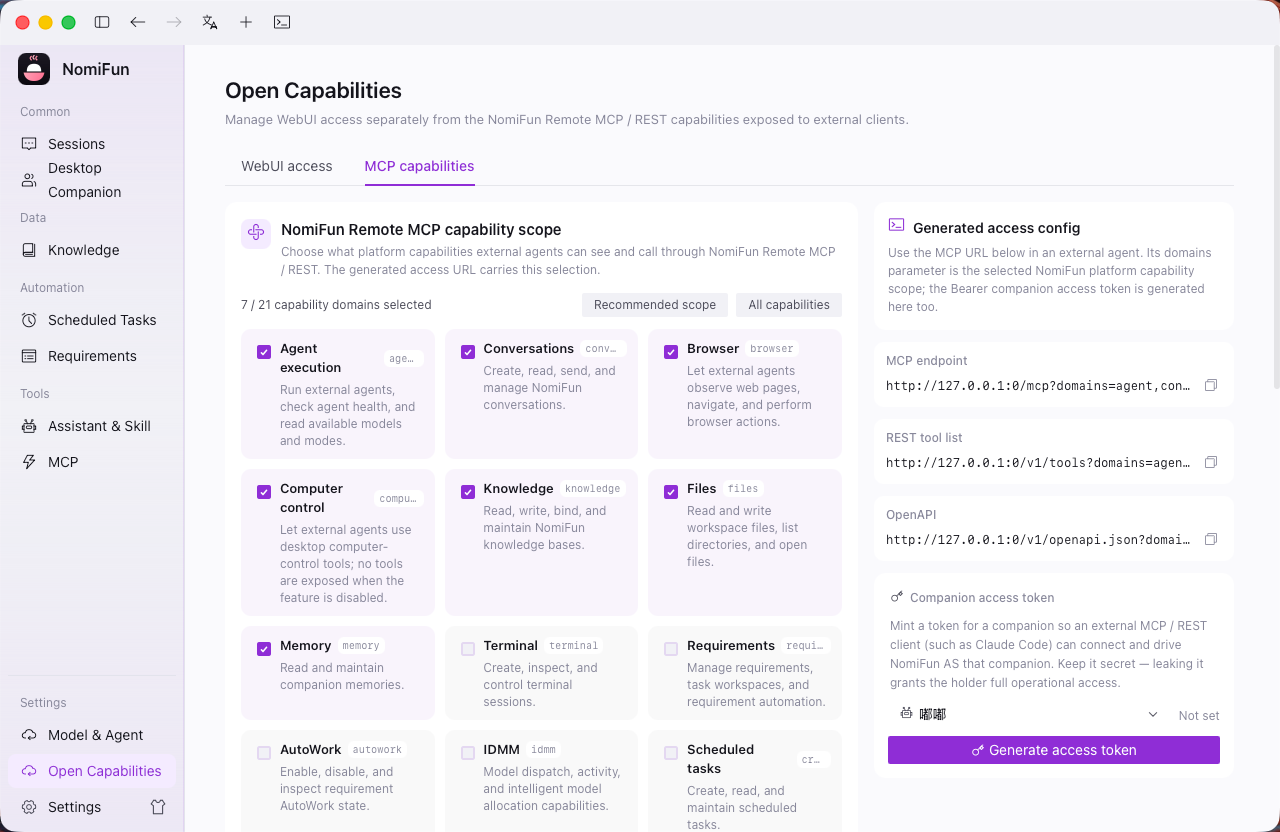
Entry point: view and manage these outbound fronts in the Open Capabilities panel (
/open-capabilities); review each one before enabling it.
The three public fronts
| Front | Path | Best for |
|---|---|---|
| Full MCP | /mcp | MCP clients that need the full platform control surface (all Remote-surface tools) |
| Curated MCP | /mcp-agent | MCP clients that only want the curated do-work subset (agent / browser / computer / knowledge / files) |
| REST | /v1 | Scripts, automation, other languages; includes /v1/openapi.json (OpenAPI 3.1) and SSE streaming |
All three share one capability bus and the same companion-token auth. The headline capability is nomi_agent_run (streaming delegation) paired with nomi_agent_result (poll for long-running results).
Steps
-
Get the endpoint. Locally it’s
http://127.0.0.1:<port>(the desktop app’s loopback port, ornomifun-web’s service port); with WebUI remote access enabled it’shttp://<your-LAN-IP>:25808. -
Mint a companion-token. In the Open Capabilities panel, click “generate access token” for a companion. The token is hash-only (SHA-256), shown in plaintext just once at minting, and bound to that one companion — copy it immediately. For headless deployments, seed it at startup via an env var:
NOMIFUN_COMPANION_TOKEN=$(openssl rand -hex 32) nomifun-web, which binds to the default companion. -
Connect an MCP client. In Claude Code / Cursor and similar clients, add NomiFun as a Streamable-HTTP server under
mcpServers:{ "mcpServers": { "nomifun": { "type": "streamable-http", "url": "http://127.0.0.1:25808/mcp-agent", "headers": { "Authorization": "Bearer <companion access token>" } } } }Once connected,
tools/listshows thenomi_*tools andtools/calldrives them; swap/mcp-agentfor/mcpto get the full platform control surface. -
Or use REST. Scripts and automation hit HTTP directly with the same auth header:
# List capabilities (lean agent profile) curl -s "http://127.0.0.1:25808/v1/tools?profile=agent" \ -H "Authorization: Bearer $TOKEN" # Delegate a goal to an autonomous nomi agent in one call curl -s -X POST "http://127.0.0.1:25808/v1/tools/nomi_agent_run" \ -H "Authorization: Bearer $TOKEN" -H "Content-Type: application/json" \ -d '{"goal":"Research competitor pricing and write notes.md","timeout_secs":600}' # => {"result":{"conversation_id":123,"status":"completed","text":"..."}} # Long tasks return {"status":"running",...}; poll with nomi_agent_result -
Use streaming for live progress.
POST /v1/tools/nomi_agent_run/streamis SSE, emitting onedata:delta event per line with a final{"type":"__result__",...}frame carrying the result; on the MCP side, long tasks return a{status:running}handle fromnomi_agent_runthat you poll withnomi_agent_result. -
Generate a client from OpenAPI (optional).
GET /v1/openapi.json[?profile=agent]is an OpenAPI 3.1 contract — feed it toopenapi-generatorfor a typed client in any language, or import it into Postman / Insomnia / Bruno.
Notes and boundaries
- Runs as the companion: calls inherit the bound companion’s profile model, persona, and knowledge base, and companions are isolated from one another. When
nomi_agent_rundoesn’t specify amodel, it uses that companion’s profile model — so the companion must have a working model configured (otherwise minting returns awarningand model-dependent capabilities fail). - Permission tiers (Remote surface): read / write are allowed; destructive actions need confirmation (a
needs_confirmationresponse comes back first, then retry with"confirm": trueafter restating the action to the user); sensitive capabilities (secret.*,factory_reset, etc.) are denied on the Remote surface by default and don’t appear intools/list. - Result envelope (REST): success
200 {"result": ...}; needs confirmation409 {"needs_confirmation":true,...}; tool error422; unknown tool404; missing/bad token401. - Security: holding a token is equivalent to granting remote code execution, so only hand it to trusted clients; for any public exposure, front it with a TLS reverse proxy and a firewall. Tokens can be revoked/rotated at any time, and revoking one only affects its companion.
FAQ
/mcpor/mcp-agent? Use/mcpfor the full platform control surface; use/mcp-agentfor a cleaner, get-work-done surface.- Do I need an MCP client? No — any tool that can send HTTP (n8n / Zapier / shell scripts) can point at
POST /v1/tools/{name}with zero SDK. - How do I discover capabilities?
GET /v1/tools(or?profile=agent) lists each tool’s name, description, and JSON Schema; tool names come from there.
Related
Full docs → GitHub